
WalkiNova for Wear OS
A walking and running tracker for your Wear OS watch
See your best time on your wrist, start with one tap, and follow time, distance and pace while you move. When you finish, the session is saved on your phone with its route.
Wear OS 3 or later · works with the WalkiNova Android app · free

Start, track, finish
One session, from your wrist
These are the real watch screens. Tap a step to see what you get.


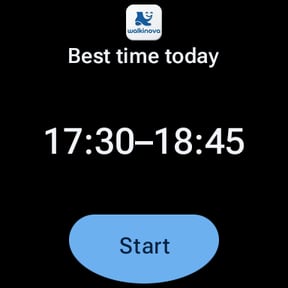
Your best time, one tap away
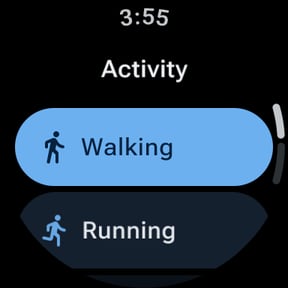
The watch shows today's best time from your phone, your last activity and one big Start button. Tap the activity to switch between walking, running, sprint, hiking, cycling and wheelchair.
WalkiNova watch home: best time today 17:30–18:45, Walking, Phone not nearby, and a Start button
The numbers that matter, nothing else
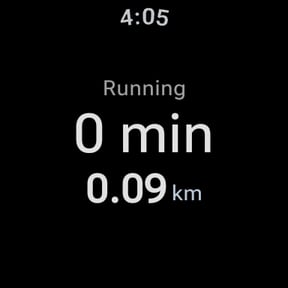
Active time, distance, and pace for walking, running and hiking or speed for cycling, sprint and wheelchair. Your phone shows the same session on Home and can pause or end it too.
WalkiNova watch live screen while running: 0:52, 0.11 km, 5:20 per km
WalkiNova phone card “Session on your watch”: 00:12:38 and 2.14 km, with Pause and End session
Finish on the watch, find it on your phone
Swipe for Pause and Finish. After you confirm, the session goes to your phone and appears in your history with its map. If the phone isn't nearby, the watch keeps it and sends it later.
WalkiNova watch controls: a large Pause button and a Finish button
WalkiNova phone message: Done. Session from your watch saved.
What the watch does
Made for a quick glance
Best time on your watch face
The Tile shows today's best time with a Start button, and the Complication puts it on your watch face. Both update when your phone does.
Six activities
Walking, running, sprint, hiking, cycling and wheelchair, with large buttons that are easy to hit on the move.
Control from either side
Pause, resume or finish from the watch or the phone. Pressing twice, or on both at once, does the same as pressing once.
Leave the phone at home
Start on the watch and it records with its own location. The session waits on the watch until your phone is back in reach.
Screen off, still tracking
Lower your wrist and a dim always-on view keeps showing minutes and distance. The WalkiNova icon on the watch face brings you back.
No GPS? Time still counts
If you don't allow location on the watch, the session still starts and records time only. You're never blocked.
- Tile
- Activities
- Always-on


Phone and watch
Start where you like. Nothing is counted twice.
The rule is simple: the device where you press Start records the route. The other one becomes a live display and a remote.
Start on the phone
The phone tracks with its GPS, as always. The watch switches to the live screen and can pause, resume or finish.
Start on the watch
The watch tracks. Your phone shows a “Session on your watch” card on Home with Pause and End session.
Saved like any other session
Watch sessions land in your phone's history with their route. Signed in with Google, they're backed up; as a guest, they stay on your phone.
What the watch app doesn't do
- No heart rate.
- No maps, history, stats or route images on the watch. Those stay on your phone.
- It isn't a standalone app: it needs WalkiNova on an Android phone.
- No Apple Watch, and no iPhone pairing.
What you need
- A watch with Wear OS 3 or later
- An Android phone paired with the watch, with WalkiNova from Google Play
- Location allowed on the watch, for distance
Install WalkiNova on your phone, then install it on your watch from the Play Store.
Wear OS FAQ
Questions about the watch app
Which watches does WalkiNova work on?
Watches running Wear OS 3 or later, paired with an Android phone. It works on round and square screens.
Does it work with an Apple Watch or an iPhone?
No. The watch app is for Wear OS only, and it needs the WalkiNova app on an Android phone. Google Play doesn't offer it on watches paired with an iPhone.
Do I need to carry my phone?
No. If you press Start on the watch, the watch records the session with its own location. When your phone is back in reach, the session is sent to it and saved. You do need the phone app to save sessions and to get your best time.
Does the watch track heart rate?
No. WalkiNova doesn't record heart rate, on the watch or on the phone.
What does the watch show during a session?
Active time, distance, and pace (walking, running, hiking) or speed (cycling, sprint, wheelchair). Swipe for Pause, Resume and Finish. When the screen dims, it keeps showing minutes and distance.
How does it handle battery and GPS?
The watch gets location through Wear OS Health Services, refreshes the live screen at most once a second (once a minute when dimmed) and stops GPS as soon as you pause or finish. Any GPS workout uses battery, and how much depends on your watch. GPS accuracy also depends on the watch.
Where are my watch sessions saved?
On your phone, like any other WalkiNova session: in your history, with the route. If you're signed in with Google, they're backed up to your account. The watch deletes its copy only after the phone confirms it has saved it.
Is the watch app free, and which languages does it speak?
It's free, like the phone app. The watch speaks English, French, German, Italian, Romanian and Arabic.
Get WalkiNova on your phone, then on your watch
Install the free Android app, add WalkiNova to your Wear OS watch, and start your next walk from your wrist.

Free on Google Play · Android phone + Wear OS 3 or later
Back to WalkiNova